BinAssist · Semantic Graph Workflow
Graph building and exploratory reverse-engineering workflow.
Workflow: Building a Semantic Graph
This guide walks you through building and using a semantic graph of your binary, enabling rich contextual understanding and security analysis.
Overview
The Semantic Graph creates a knowledge base of your binary that captures:
- Function information and relationships
- LLM-generated summaries and categorizations
- Security flags and risk assessments
- Taint analysis paths for vulnerability detection
- Function communities and modules
This graph enhances LLM queries and enables structured exploration of the binary.
When to Build a Semantic Graph
Build a semantic graph when you want to:
- Understand a binary's overall structure
- Find security-relevant functions systematically
- Enable rich context for LLM queries
- Identify related function groups
- Trace data flows for vulnerability analysis
Step-by-Step Workflow
Step 1: Open the Semantic Graph Tab
Navigate to the Semantic Graph tab in BinAssist. You'll see the List View sub-tab with an empty or previously populated function list.
Step 2: ReIndex the Binary
Click ReIndex Binary in the Manual Analysis panel to build the foundation.
This process:
- Extracts all functions from the binary
- Records function addresses, names, and sizes
- Builds the call graph (CALLS edges)
- Identifies imports and exports
The time required depends on binary size:
- Small binaries (< 100 functions): A few seconds
- Medium binaries (100-1000 functions): Under a minute
- Large binaries (1000+ functions): Several minutes
Step 3: Run Semantic Analysis
Click Semantic Analysis to generate LLM-powered summaries.
For each function, the LLM generates:
- Purpose summary
- Activity profile (what the function does)
- Security flags (network, file I/O, crypto, etc.)
- Risk assessment
This step is LLM-intensive and may take time for large binaries. Progress is shown in the status area.
Step 4: Run Security Analysis
Click Security Analysis to perform taint analysis.
This process:
- Identifies sources (functions that receive external input)
- Network receive functions (recv, read from socket)
- File read functions
- User input functions
- Identifies sinks (potentially dangerous operations)
- strcpy, sprintf (buffer overflows)
- system, exec (command injection)
- SQL functions (injection)
- Traces paths from sources to sinks
- Creates TAINT_FLOWS_TO and VULNERABLE_VIA edges
Discovered vulnerability paths are stored in the graph for review.
Step 5: Run Community Detection
Click Community Detection to group related functions.
Using the Label Propagation algorithm, this:
- Analyzes call relationships
- Groups functions that frequently interact
- Labels communities by common purpose
Communities help you understand the binary's modular structure:
- "Network I/O" - functions handling network communication
- "Crypto" - cryptographic operations
- "File Operations" - file system interactions
- "String Processing" - string manipulation functions
Exploring the Graph
List View
Browse all indexed functions:
- Click a row to see callers and callees
- Sort by clicking column headers
- Use the table to navigate the binary
Visual Graph
Explore relationships visually:
- Nodes represent functions
- Edges show call relationships
- Colors indicate communities or security flags
- Click nodes for details
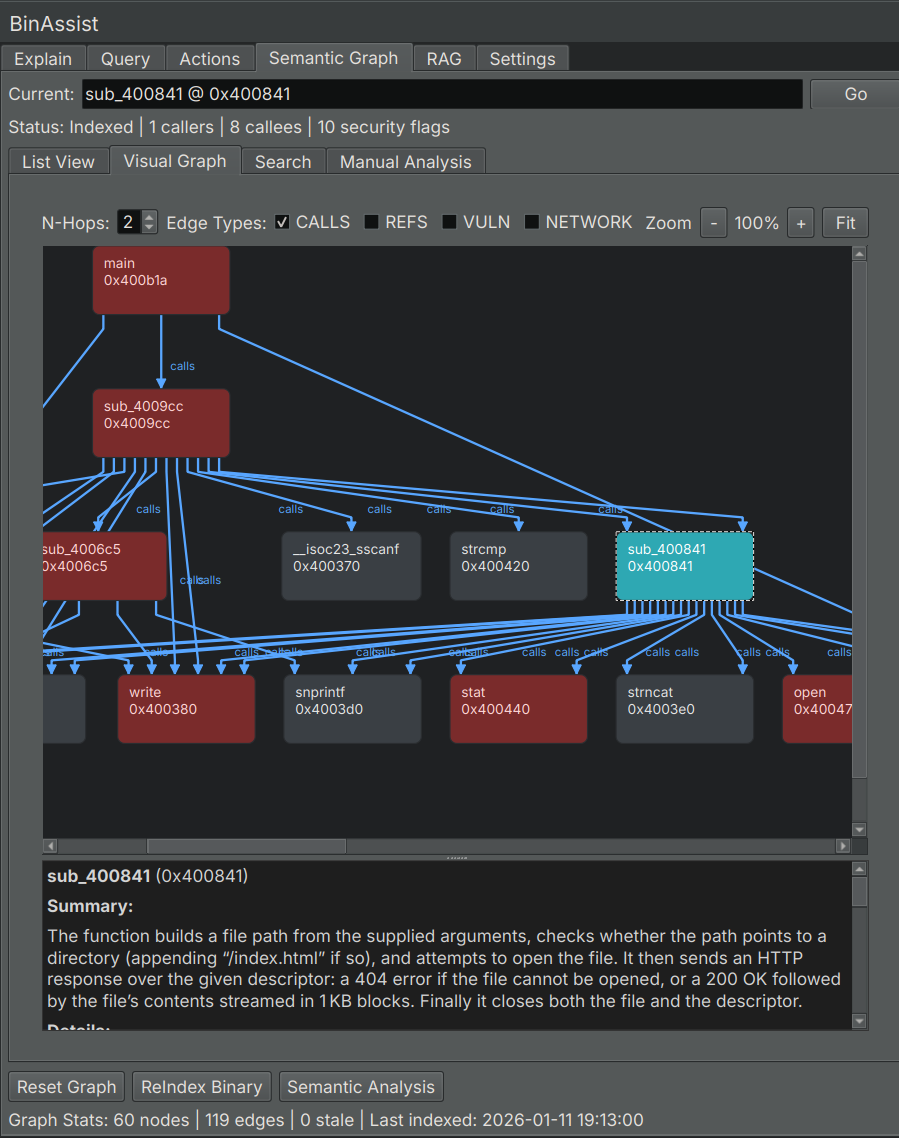
Search
Find functions by keyword:
- Switch to the Search sub-tab
- Enter keywords (function names, summary terms)
- Review results with relevance scores
Using the Graph with LLM Queries
The semantic graph enhances LLM queries when MCP is enabled:
- Build the semantic graph (Steps 1-5 above)
- Go to the Query tab
- Enable MCP
- Ask questions that benefit from graph context
The LLM can now:
- Query for functions by purpose
- Find related functions
- Trace call chains
- Identify security-relevant code
Example queries:
- "What functions handle network input?"
- "Show me the call chain from main to any crypto functions"
- "Which functions have high security risk?"
Incremental Updates
You don't need to rebuild everything when the binary changes:
- ReIndex: Run after structural changes or when starting fresh
- Semantic Analysis: Run on functions that lack summaries
- Security Analysis: Run after semantic analysis or when checking for new patterns
- Community Detection: Run after significant changes to function relationships
Tips for Effective Graph Building
Start Small
For large binaries:
- ReIndex to get the structure
- Run Semantic Analysis on key functions first
- Expand analysis as needed
Focus on Interesting Areas
Not every function needs deep analysis:
- Entry points and exports
- Functions with security flags
- Functions in critical call paths
Iterate
The graph is a living resource:
- Build initial graph
- Use it in queries
- Refine based on what you learn
- Re-run analyses as understanding deepens
Combine with Manual Analysis
Use the graph alongside manual reverse engineering:
- Graph shows the big picture
- Manual analysis provides depth
- Queries connect the two
Related Documentation
- Semantic Graph Tab Reference - UI element details
- Query Workflow - Using the graph in queries