GhidrAssist · RAG
Knowledge augmentation and document-assisted workflows.
RAG Tab Reference
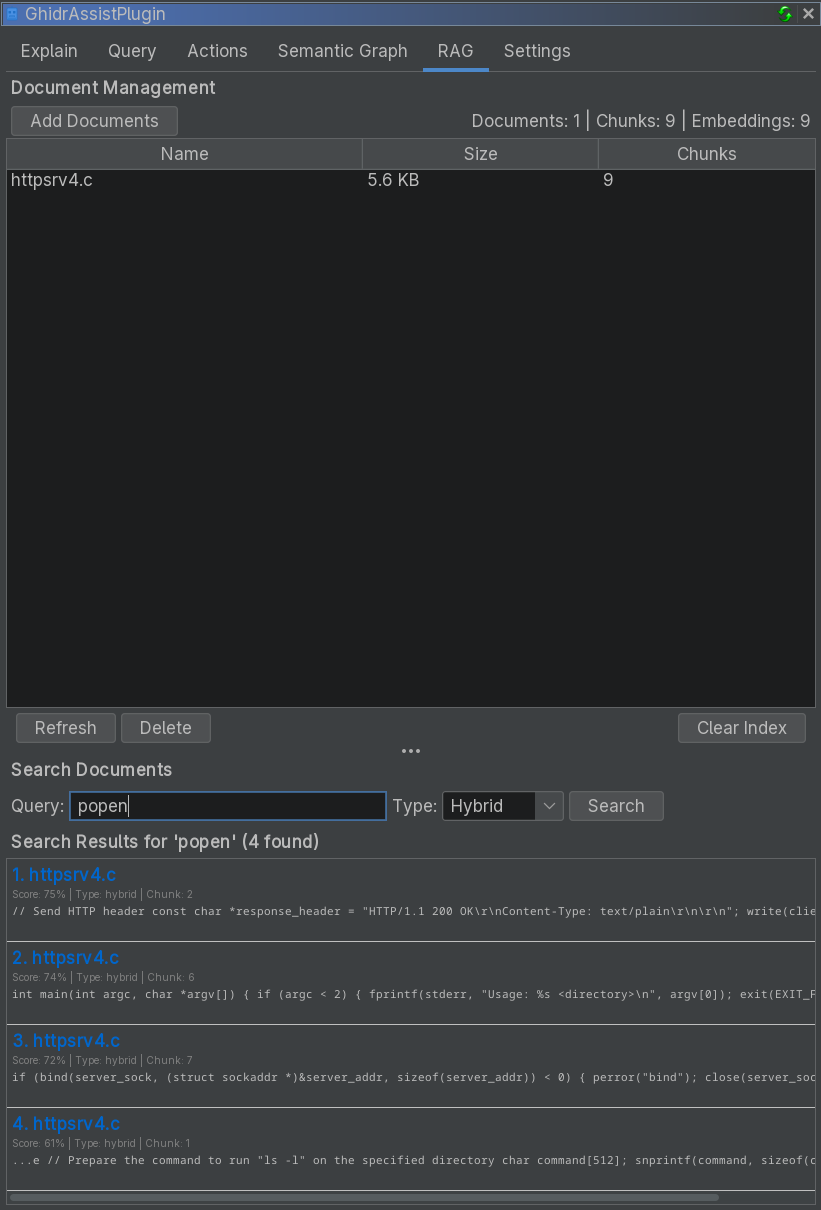
The RAG (Retrieval-Augmented Generation) tab manages external documentation for context-enhanced analysis.
Purpose
RAG lets you import documentation (protocols, APIs, notes) so the LLM can reference it during analysis.
UI Elements
Document Management
- Add Documents: Import files
- Refresh: Re-index selected document
- Delete: Remove selected document
- Clear Index: Remove all indexed documents
Document table columns:
| Column | Description |
|---|---|
| Name | Document filename |
| Size | File size |
| Chunks | Indexed chunk count |
Search Panel
Search the index to validate results:
- Query input
- Search Type: Hybrid / Semantic / Keyword
- Results list with relevance scores
Supported Document Types
.txt(plain text).md(markdown).pdf(PDF text extraction)
Search Types
| Type | Description |
|---|---|
| Hybrid | Combines keyword and semantic search |
| Semantic | Vector similarity search |
| Keyword | Traditional full-text search |
Using RAG in Analysis
- Import documents in the RAG tab
- Enable Use RAG in the Query tab
- Ask your question or run analysis