IDAssist · Overview
Product overview, capabilities, and workflow orientation for the IDA plugin.
IDAssist Documentation
Welcome to the IDAssist documentation. This guide covers installation, configuration, and usage of IDAssist — an AI-powered reverse engineering plugin for IDA Pro.
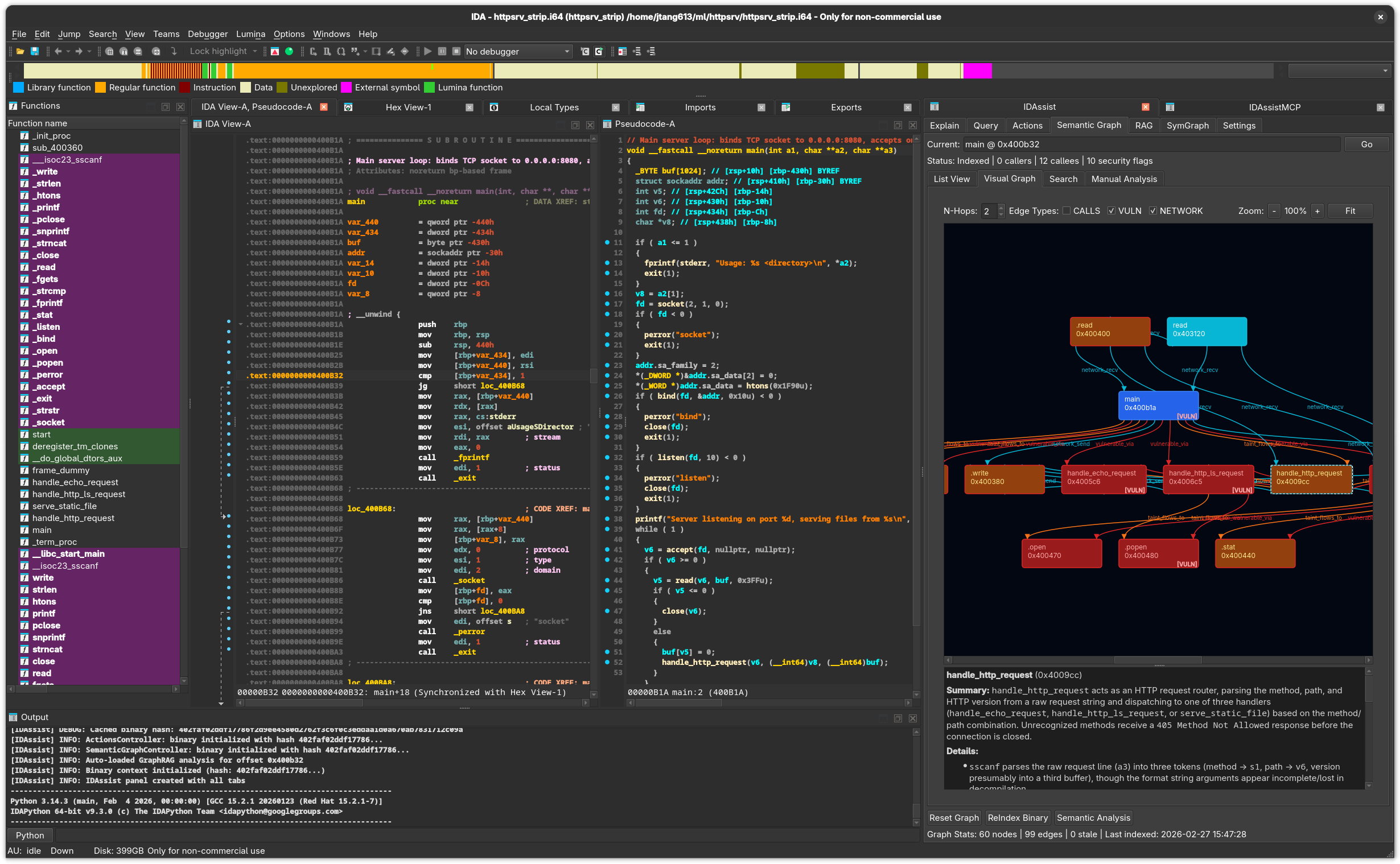
What is IDAssist?
IDAssist is an IDA Pro plugin that brings LLM-powered analysis directly into your reverse engineering workflow. It provides AI-assisted function explanation, interactive querying, automated rename suggestions, a semantic knowledge graph, RAG-powered document search, and collaborative symbol sharing through SymGraph.
IDAssist runs as a dockable panel inside IDA Pro 9.0+ and connects to LLM providers (Anthropic, OpenAI, Ollama, LiteLLM) to analyze binary code. All data is stored locally in SQLite databases under ~/.idapro/idassist/.
Tabs Overview
IDAssist organizes its functionality into seven tabs:
| Tab | Description |
|---|---|
| Explain | Generate function and line explanations with security analysis |
| Query | Interactive chat with context macros, ReAct agent, and MCP tools |
| Actions | AI-powered rename and retype suggestions with confidence scores |
| Semantic Graph | Knowledge graph with visual explorer, search, and community detection |
| RAG | Upload reference documents for context-enriched analysis |
| Settings | Configure LLM providers, MCP servers, SymGraph credentials, system prompt, and database paths |
Key Features
MCP Tool Integration
IDAssist provides built-in internal tools — function lookup, disassembly, pseudocode, cross-references, renaming, and graph queries — that LLMs can invoke during reasoning via function calling. You can also connect to external MCP servers for additional tool capabilities.
ReAct Agent
The Query tab supports an autonomous ReAct agent mode where the LLM plans an investigation, executes tools to gather information, reflects on findings, and synthesizes answers across multiple reasoning rounds.
Extended Thinking
Control reasoning depth with four effort levels:
| Level | Token Budget | Use Case |
|---|---|---|
| None | Disabled | Quick, simple questions |
| Low | ~2K tokens | Straightforward analysis |
| Medium | ~10K tokens | Moderate complexity |
| High | ~25K tokens | Deep analysis, complex functions |
Semantic Graph
Build a searchable knowledge graph of the binary's functions, relationships, and security characteristics. Includes:
- Automatic function indexing via
idautils.Functions() - LLM-generated summaries for each function
- Security flag detection (buffer overflow, injection, format string, etc.)
- Network flow and taint analysis
- Community detection for module identification
- Visual graph rendering with Graphviz layout
Supported LLM Providers
| Type | Auth | Streaming | Tool Calling |
|---|---|---|---|
anthropic_platform | API Key | Yes | Yes |
anthropic_oauth | OAuth | Yes | Yes |
anthropic_claude_cli | Local CLI | Yes | Yes |
openai_platform | API Key | Yes | Yes |
openai_oauth | OAuth | Yes | Yes |
ollama | None (local) | Yes | Model-dependent |
litellm | Proxy URL | Yes | Provider-dependent |
Recommended Models
| Provider | Model | Notes |
|---|---|---|
| Anthropic | claude-sonnet-4-6 | Best balance of speed and quality |
| OpenAI | gpt-5.3-codex | Fast general analysis |
| Ollama | qwen2.5-coder:32b | Fully local, no API key |
Architecture Overview
IDAssist uses an MVC architecture:
idassist_plugin.py          # IDA plugin entry point
src/
├── views/                  # PySide6 tab widgets (UI)
├── controllers/            # Signal handlers, state management
├── services/               # Business logic, DB access
│   ├── llm_providers/      # LLM provider implementations
│   ├── graphrag/           # Knowledge graph services
│   ├── streaming/          # Streaming response rendering
│   └── ...
└── mcp_server/             # Internal tool definitions and handlers
- Views emit Qt signals on user interaction
- Controllers connect signals to service methods
- Services handle LLM calls, database access, and graph analysis
- All IDA API calls run on the main thread via
execute_on_main_thread() - LLM responses stream incrementally to the UI
Getting Started
New to IDAssist? Start with the Getting Started Guide for installation, provider setup, and your first analysis.
Workflows
Step-by-step guides for common tasks:
- Explain Workflow — Analyze and document functions
- Query Workflow — Ask questions with context macros, MCP, and ReAct
- Semantic Graph Workflow — Build and explore the binary knowledge graph
Tab Reference
Detailed reference for each tab's UI elements and capabilities: