IDAssist · Actions
Action suggestions, rename flows, and structured application.
Actions Tab Reference
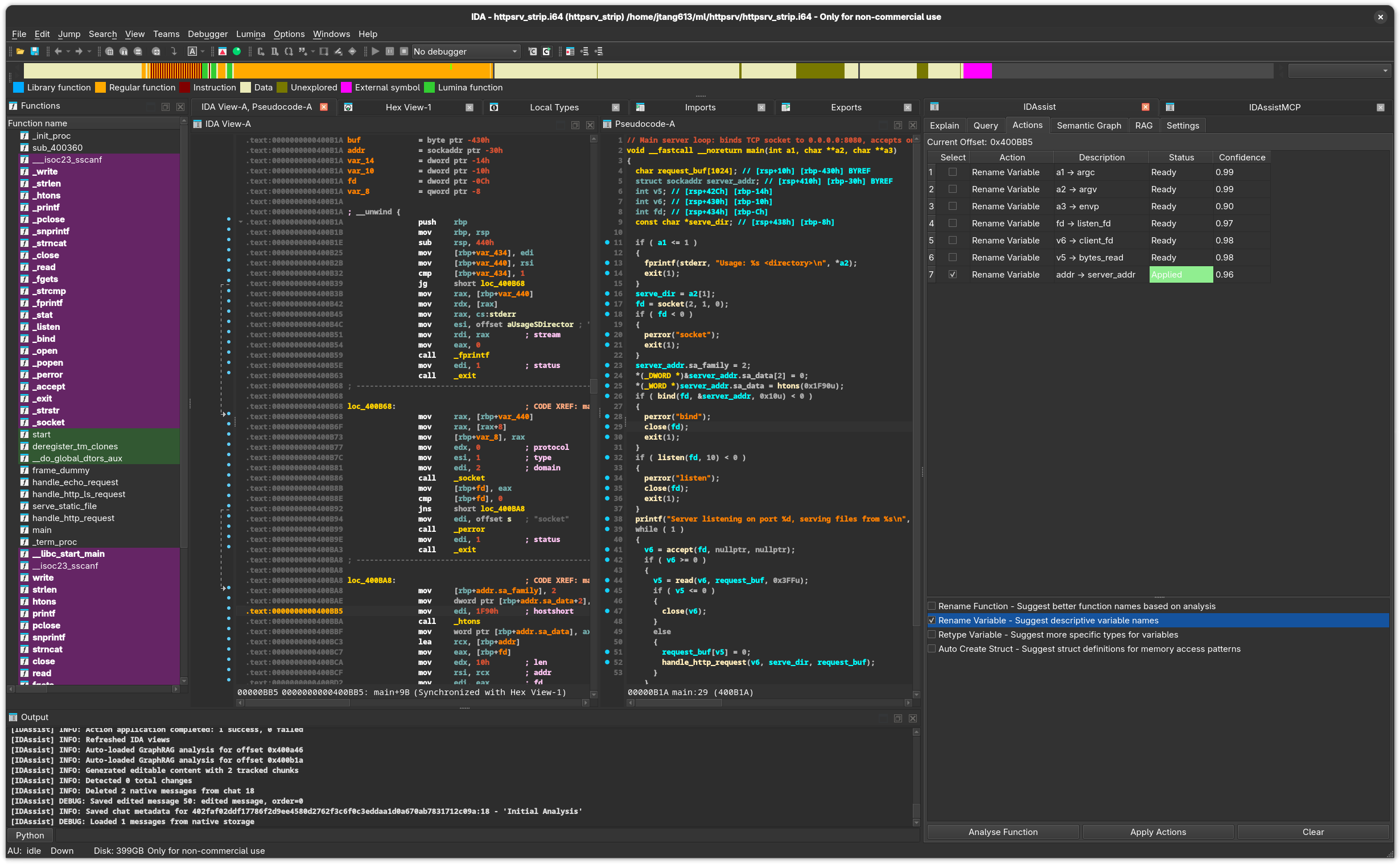
Purpose
The Actions tab uses LLM analysis to suggest renames for functions, variables, and types, and can propose structure definitions. You review proposed changes in a table with confidence scores, then selectively apply them back to the IDB.
UI Elements
Top Row
| Element | Description |
|---|---|
| Current Offset | Address of the function under the cursor. |
Proposed Actions Table
Displays the LLM's suggestions after analysis:
| Column | Description |
|---|---|
| Select | Checkbox to include this action when applying. |
| Action | The type of action (rename_function, rename_variable, retype_variable, create_struct). |
| Description | Human-readable description of the proposed change. Editable — double-click to modify. |
| Status | Current state: Pending, Applying..., Applied, or Error. |
| Confidence | Model's confidence score (0.0 to 1.0). |
Status Color Coding:
| Status | Color |
|---|---|
| Applying... | Light yellow background |
| Applied | Light green background |
| Error: ... | Light red background |
Available Actions
Checkboxes to control which action types the LLM should suggest:
| Action | Description |
|---|---|
| Rename Function | Suggest a meaningful name for the current function. |
| Rename Variable | Suggest meaningful names for local variables and parameters. |
| Retype Variable | Suggest corrected types for variables. |
| Auto Create Struct | Propose structure definitions based on field access patterns. |
Button Row
| Button | Description |
|---|---|
| Analyse Function | Send the current function to the LLM with selected action types. |
| Apply Actions | Apply all checked actions from the table to the IDB. |
| Clear | Remove all proposed actions from the table. |
Workflow
- Select action types — Check which kinds of suggestions you want (rename functions, variables, etc.)
- Click Analyse Function — The LLM analyzes the function and populates the table
- Review proposals — Check confidence scores, read descriptions, edit if needed
- Select actions to apply — Use checkboxes to choose which changes to make
- Click Apply Actions — Selected changes are applied to the IDB
Action Types
Rename Function
Suggests a descriptive name based on what the function does. The LLM considers:
- Function behavior and purpose
- Called APIs and library functions
- String references and constants
- Calling context
Rename Variable
Suggests meaningful names for local variables and parameters. Works best with Hex-Rays pseudocode where variable roles are clearer.
Retype Variable
Proposes corrected types when the decompiler's type inference is wrong or too generic (e.g., changing int to HANDLE or char * to const wchar_t *).
Auto Create Struct
Analyzes field access patterns to propose structure definitions. Useful when the decompiler shows repeated offset-based access to a data pointer.
IDA-Specific Details
- Function renames are applied via
ida_name.set_name() - Variable renames use
ida_hexrays.rename_lvar()(requires Hex-Rays) - All IDB modifications execute on IDA's main thread via
execute_on_main_thread() - The
execute_on_main_thread()wrapper usesidaapi.execute_sync(callback, MFF_FAST) - Structure creation requires Hex-Rays for type system integration
Related Documentation
- Explain Tab — Understand a function before applying actions
- Query Tab — Ask questions about specific rename choices
- Settings Tab — Configure the LLM provider used for analysis